Senaro AI for SDRs and BDRs
Senaro AI is the side-task layer for SDRs and BDRs. Your cadence tool handles your sequences. It does not handle the research, the custom one-offs, or the hand-offs to your AE. That long tail lives in Apple Notes today, and Senaro AI is where it goes instead.
SDRs and BDRs running high task volume, short task lifecycles, parallel sequences across dozens of target accounts. Outreach or Salesloft covers the scheduled touches. Senaro covers everything around them: research, custom outreach, hand-off prep, week-in-review.
What you're actually trying to do
Capture every side-task in one line
Type 'research Acme exec changes before Wednesday cold call' and Senaro files it to the Acme tile, tags it research, sets the due date. No project to file under, no form to open.
See where the week actually went
Walk into your 1:1 with a real picture of your week. Not just sequence activity from your cadence tool but the prep work, the side conversations, the custom touches that don't fit a cadence.
Hand off cleanly to the AE
When a meeting is booked, the AE needs context that doesn't fit in the calendar invite. The tile-per-account view gives you a clean place to brief the next call.
Why the current setup falls short
- High task volume, short task lifecycles. Things drop fast when there's no structure.
- The cadence tool is the system for sequences, not for everything else you actually do.
- Research notes, custom touches, hand-off prep all live in Apple Notes or a scratch tab.
- Manager 1:1s feel like they're about cadence stats, not the full picture of what you did this week.
- Hard to keep track of which target accounts you've actually engaged outside of sequences.
How SDRs and BDRs actually use Senaro AI
Target account research
'Research Acme's new VP of Sales before Thursday's cold call.' Senaro tags it research, files it to the Acme tile, sets the due date. When you click into Acme later, it's right there.
Custom outbound that doesn't fit a cadence
The personalised LinkedIn note. The follow-up after a no-show. The intro to the second persona at the account. Capture each in one line and tag as prospecting.
Meeting-booked handoff prep
AE booked Tuesday at 2pm. Tile shows you have three open prep items, two pieces of recent research, and the cold call notes. Walk in five minutes ahead of the call already context-ready.
Week-in-review
Friday afternoon: filter by 'this week, completed' for a real picture of what shipped. Take that into Monday's 1:1 with substance beyond cadence metrics.
What you get
Account tiles for target accounts
Every target account is a tile. Every research note, prep item, and custom touch ties to it. The view your hand-off needs is built in.
Invisible AI on every entry
Type a sentence. The AI parses the account, due date, urgency, and tag. Speed matters when you're filing 30 tasks a day.
Sales-native tags out of the box
Prospecting, Research, Client Facing, CRM Admin. Defaults that fit how SDRs actually work, no taxonomy to invent.
AI Import for batch capture
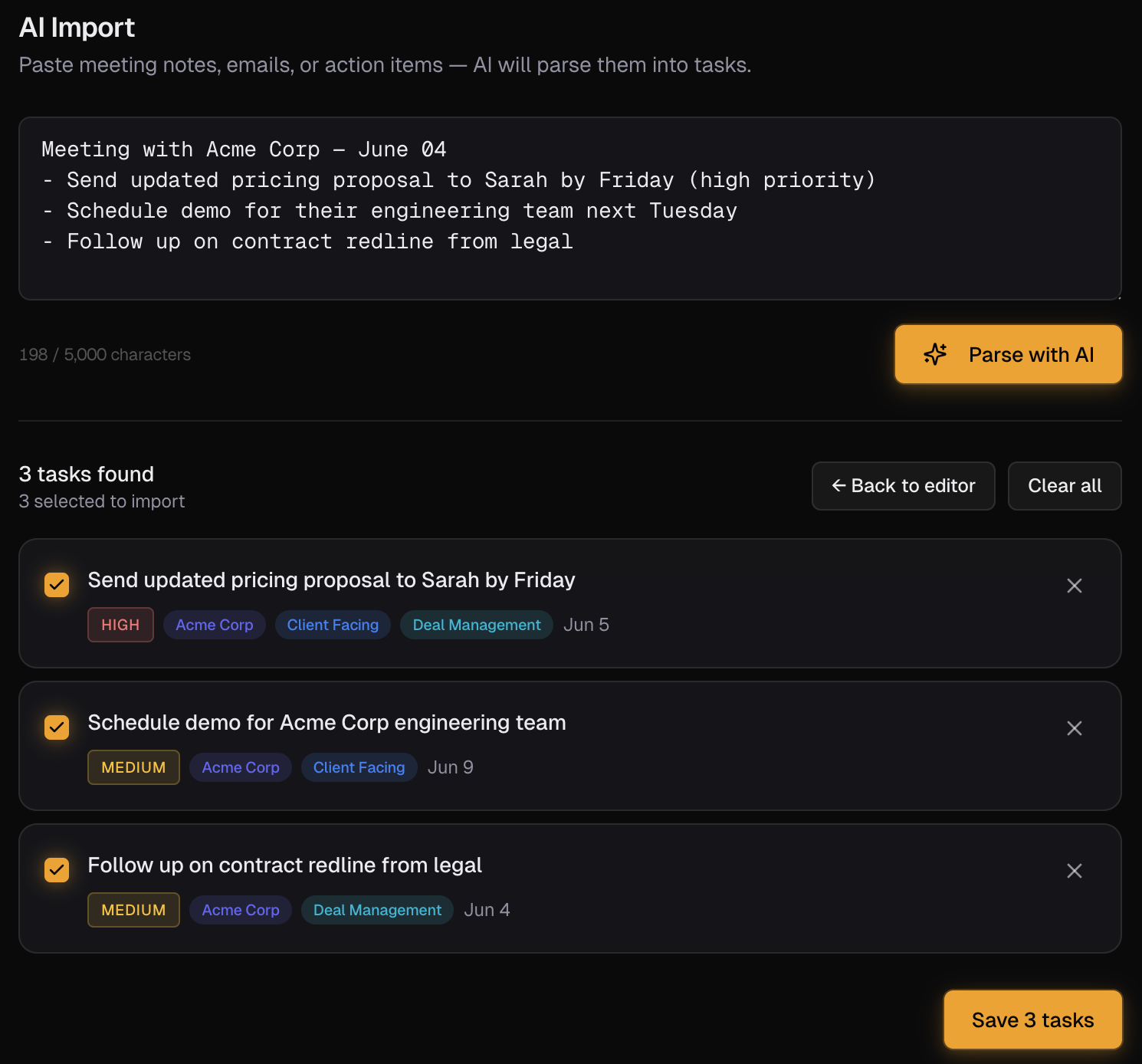
Paste a list of target accounts you researched this morning, get a structured task list back filed to tiles. Same flow for a stack of LinkedIn profile notes.
Mobile-optimised
Capture a task on the way out of a meeting room or between calls. Full iPhone Safari experience, not a desktop tool with a tacked-on mobile view.
Your starter template
Pick 'SDR / BDR' during onboarding. You get role-specific default tags (Prospecting, Research, Client Facing, CRM Admin), sample target-account tiles, and example tasks pre-loaded. Five minutes from sign-up to working plan.
Frequently asked questions
Does Senaro AI replace my cadence tool?
No. Outreach and Salesloft are great at sequence execution. Senaro is for everything around the sequence: research, custom outreach, hand-off prep, side conversations. They complement each other.
Will my manager see my task list?
No. Senaro is a single-user account that you pay for on a personal card. No manager dashboards, no shared workspaces.
I file 50 things a day. Will I burn through credits?
Free plan is 25 AI credits a month, Pro is 150 a month, and credit packs are $5 for 50 (never expire). If you're a heavy user, Pro plus an occasional top-up covers it. You can also add tasks without AI parsing if you want to save credits.
Does Senaro work on mobile?
Yes. Full iPhone Safari experience with a bottom tab bar, mobile-safe dialogs, and quick-add from any view. Built for capturing tasks between meetings.
Can I import target account lists?
Use AI Import: paste your list as a block and the parser creates tiles and prep tasks automatically. Or create tiles manually if you want more control over naming.
Is my pipeline data safe?
Yes. Encrypted in transit and at rest. Customer data is never used to train AI models. Only task text is sent to our AI provider for parsing, never your account data, and you can pause AI processing at any time.
Explore more
New to sales task managers? Compare your options in our guides to the best sales task managers and the best free task managers.
Or see how Senaro AI compares to Todoist, HubSpot Tasks, Salesforce Tasks, Notion and Motion, or browse all alternatives.
Try it for a week
14 days of Pro, no card. Drops to Free after if you do nothing.

Built by Arjun Sinha. 13+ years on the sales front line before founding Senaro AI, including AE, Sales Leadership, and GTM Consulting at Series A+ SaaS companies. Senaro AI is built around how a sales day actually flows, not how a product manager imagines one does.