Senaro AI for Account Executives
Senaro AI is the personal task layer for Account Executives. Stop dropping follow-ups across 30 active accounts. Type a follow-up the way you'd say it out loud and the AI silently files it to the right account tile with the right tag and due date. Walk into every forecast call with a sorted plan, not a triage queue.
AEs at post-Series-A SaaS companies carrying 5 to 30 active deals. You're tracking redlines, renewals, recaps, intros, and a long tail of follow-ups across multiple accounts at different deal stages. Your CRM is mandatory but unloved, and your real work lives in seven places.
What you're actually trying to do
Capture without breaking flow
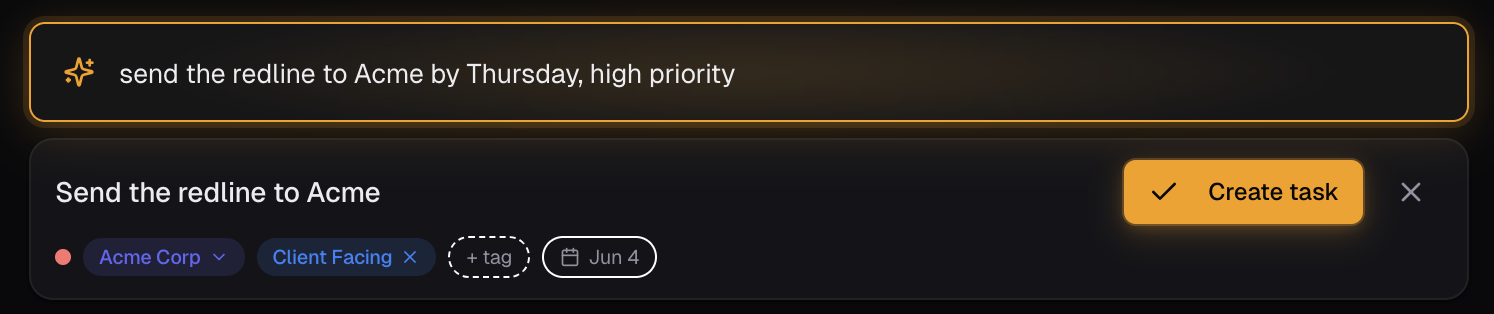
Get a task out of your head (or a meeting note, or an email thread) and into a structured plan in one line, no form to open. Type 'send the redline to Sarah at Acme by Thursday' and Senaro files it to the Acme tile, marks it client-facing, sets the due date.
Surface the next thing
Every morning, see what to do next today, sorted by what actually matters across all your accounts. Renewals first, then redlines, then the recaps that have been sitting in drafts.
Walk into a forecast call ready
Click into the Acme tile and see every open task tied to that account in one place. No stitching context from four tools. No 'let me get back to you on that' mid-call.
Why the current setup falls short
- Things keep slipping. The Friday-evening feeling that you missed something this week.
- The CRM task UI is unusable. It's built for your manager's activity reports, not for how you actually work.
- Personal systems decay. The Notion page you built during a productivity binge has been read-only since week three.
- Renewals slip through the cracks. The one you nearly forgot only resurfaced when the customer mentioned it.
- You're spending too much time being your own assistant on top of being a closer.
How Account Executives actually use Senaro AI
Friday afternoon meeting note dump
Paste this week's meeting notes into AI Import. Get a structured task list back in five minutes, already filed to the right accounts with due dates set. Walk into Monday with the week already triaged.
Sunday-night dread, solved
Open the app on Sunday night, see Monday already sorted with the renewal you nearly forgot at the top. Sleep without the running mental checklist.
Mid-week QBR prep
Click the Acme tile. Every open task on that account in one place. Renewal date, outstanding redlines, pending intros, last call's follow-ups. Walk in knowing what's outstanding without 20 minutes of context-stitching.
Post-call follow-up
Complete 'Call Acme about renewal'. Senaro suggests 'Send renewal proposal to Acme, due Monday' and you accept in one click. Client-facing loops never close orphaned.
What you get
Account tiles built in
Every account is a tile. Every task ties to one. The view your forecast call needs is the default view, not a saved filter you have to build.
Invisible AI on every entry
Type a sentence. The AI parses the account, due date, urgency, and tag. No prompt, no chatbot, no 'ask Senaro to...'. Just type and Enter.
Sales-native tags out of the box
Client Facing, CRM Admin, Deal Mgmt, Prospecting, Renewal. No taxonomy to invent on day one. Custom tags on Pro for the work that doesn't fit a default.
AI Import for meeting notes
Paste a block of notes or call recap, get back a structured task list filed to accounts. The Friday-afternoon killer feature.
AI follow-up suggestions
Complete a client-facing task, get an AI-suggested next step you can accept in one click. Follow-up suggestions are free and never consume credits.
Your starter template
Pick 'Account Executive' during onboarding. You get role-specific default tags (Client Facing, Deal Mgmt, Renewal, CRM Admin), sample account tiles, and example tasks pre-loaded. Five minutes from sign-up to working plan.
Frequently asked questions
How do I stay organized as an account executive?
Run your day from one sorted list beside the CRM, not from the CRM itself. Capture every follow-up in one line the moment it comes up on a call, tie it to the account, and give it a real due date so it resurfaces on the day it matters. Account tiles then roll up every open task on a deal, so forecast prep is a glance instead of an archaeology dig through notes apps and inbox flags.
Will Senaro AI replace my CRM?
No. Your CRM is for your manager, for activity reporting, and for the company's view of every deal. Senaro AI is your personal task layer. They sit side by side and do different jobs.
Does Senaro AI integrate with Salesforce or HubSpot?
Not today. Senaro is standalone by design, so you can start in minutes without an IT conversation. CRM integration is on the roadmap. In the meantime most AEs use both tools in parallel and push items to the CRM on their own cadence.
Can my manager see my Senaro tasks?
No. Senaro is a single-user account that you pay for on your personal card. There are no team workspaces, no manager dashboards, and no admin console. Your task list is yours.
How does the AI handle my account names?
It learns. Type 'Acme' a few times and the parser routes future tasks to your Acme tile automatically. You can also create tiles manually before typing tasks if you prefer to set up first.
What if the AI gets a parse wrong?
One-click correction on any field. The AI never blocks you. Wrong parses are fast to fix and the app gets sharper on your accounts and tags over time.
Is the free plan enough to try this properly?
Yes. 25 AI credits a month, 5 account tiles, all views. Enough for a real trial run on a handful of deals. Every signup also gets 14 days of Pro automatically with 150 credits, no card required.
Explore more
New to sales task managers? Compare your options in our guides to the best sales task managers and the best free task managers.
Or see how Senaro AI compares to Todoist, HubSpot Tasks, Salesforce Tasks, Notion and Motion, or browse all alternatives.
Try it for a week
14 days of Pro, no card. Drops to Free after if you do nothing.

Built by Arjun Sinha. 13+ years on the sales front line before founding Senaro AI, including AE, Sales Leadership, and GTM Consulting at Series A+ SaaS companies. Senaro AI is built around how a sales day actually flows, not how a product manager imagines one does.