Senaro AI for Customer Success Managers
Senaro AI is the task manager built for Customer Success Managers, sales-native and lightweight, with renewal, health, and expansion tags out of the box. A renewal in 30 days isn't the same as a deal in 30 days. CSMs juggle 30 to 80 accounts with their own urgency rhythm, and the existing tools either feel too heavy (Gainsight) or too generic (CRM tasks).
CSMs at SaaS companies managing 30 to 80 customer accounts. You're tracking renewals 30/60/90 days out, expansion opportunities, health check-ins, and the long tail of one-off follow-ups from every QBR. Your CRM has the data; what you need is somewhere to plan the next move.
What you're actually trying to do
Surface accounts that need attention
See which of your 60 accounts have something time-sensitive open: a renewal in 45 days, a health flag, an expansion opportunity that's gone quiet. Sorted urgency across the book, not buried in account-by-account filtering.
Every open commitment per account in one view
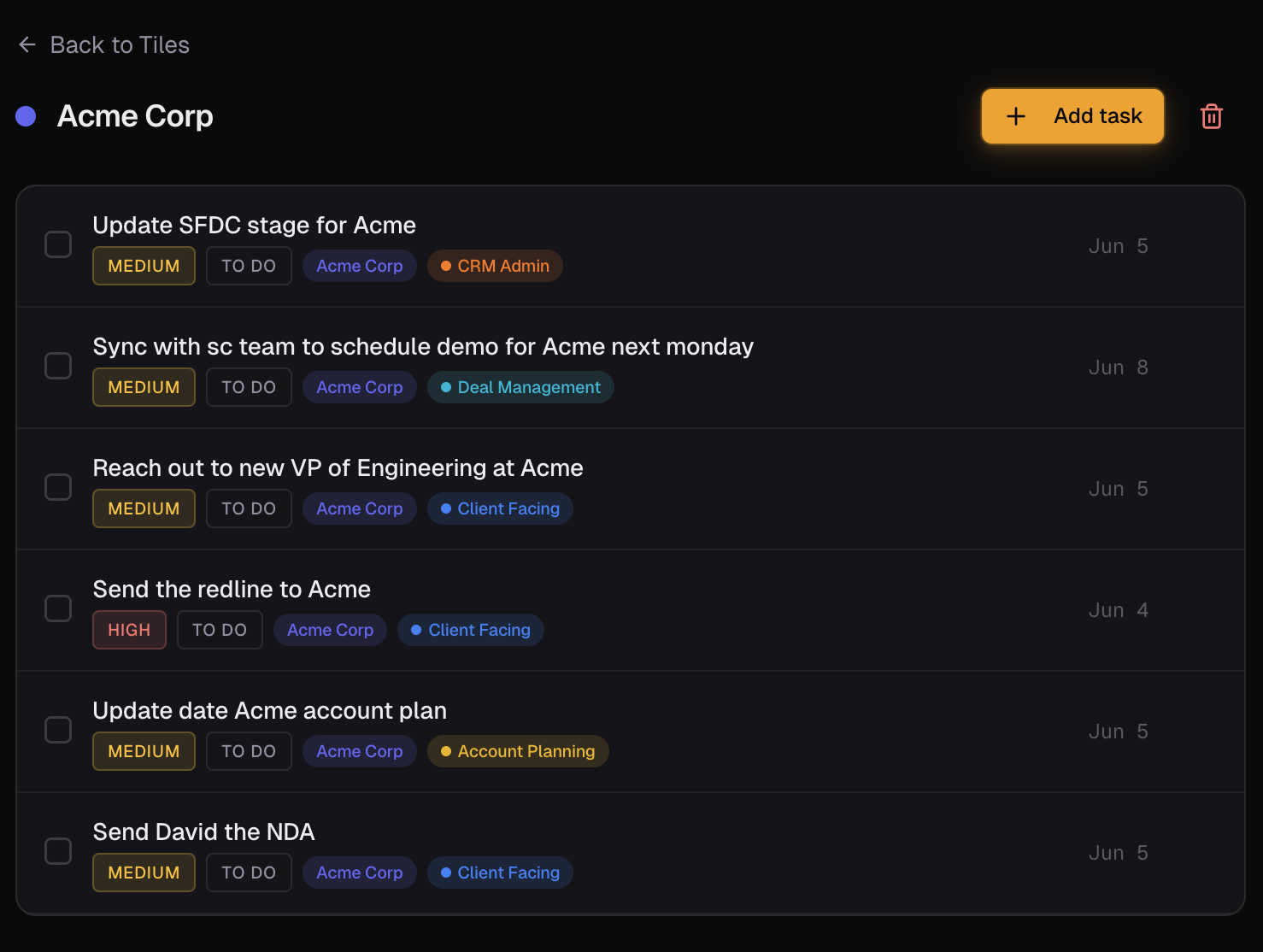
Click into the Acme tile. See the renewal date, the open expansion conversation, the last QBR's action items, the in-flight technical issue. Walk into the next call with full context.
Capture commitments mid-call without breaking flow
On the call: 'I'll send you the integration doc by Friday and check in on the budget conversation next week.' Type those two lines into Senaro after the call and they're filed to the right tile with due dates set.
Why the current setup falls short
- Gainsight is heavy and built for the program manager, not for your daily plan.
- CRM tasks are generic and don't understand renewal cadence vs deal cadence.
- Your at-risk accounts only surface when something breaks, not when you can still save them.
- Expansion opportunities get lost between QBRs because nothing surfaces them at the right moment.
- QBR prep is 30 minutes of stitching context across email, CRM, and notes.
How Customer Success Managers actually use Senaro AI
Renewal cadence tracking
Every renewal has a different rhythm: 90-day check, 60-day exec align, 30-day proposal, 14-day push. Tag renewal tasks with their stage, let Senaro surface them in order. No more 'how did this renewal get to 14 days without a proposal?'
Expansion opportunity follow-through
Customer mentioned a second team that might use the product. Type 'follow up with Sarah on expansion to APAC team' and Senaro tags it expansion, files to the account tile. Surfaces a week later when you click into the tile, not when it's already cold.
At-risk account triage
Tag tasks 'at-risk' when an account starts trending wrong. Filter the view by at-risk for a same-day picture of which accounts need executive attention.
QBR prep in 30 seconds
Click into the customer's tile. Every open task, every recent recap action item, every health flag. Walk in without 30 minutes of context-gathering.
What you get
Account tiles built for customer accounts
Every customer is a tile. Every task, follow-up, expansion conversation, and renewal item ties to it. The view your call needs is the default view.
Renewal, health, expansion tags out of the box
Default tags that match how CSMs actually work. No need to roll your own taxonomy on day one.
Invisible AI on every entry
Type a sentence after a call. The AI parses the customer, the urgency, the tag. Stay in the flow of the work, not the flow of the tool.
AI Import for QBR notes
Paste a block of meeting notes or a QBR recap, get a structured task list back filed to the customer tile. Five minutes to triage a full QBR.
Mobile-optimised
Capture commitments on the way out of a customer call. Full iPhone Safari experience, no friction between meeting and task.
Your starter template
Pick 'Customer Success Manager' during onboarding. You get role-specific default tags (Client Facing, Renewal, Expansion, Health, CRM Admin), sample customer tiles, and example tasks pre-loaded. Five minutes from sign-up to working plan.
Frequently asked questions
Does Senaro AI replace Gainsight?
Different jobs. Gainsight is a CS program platform built for ops and managers. Senaro is a personal task layer for the CSM's own daily plan. They can coexist; many CSMs use Gainsight for shared customer data and Senaro for what to do next today.
Will my manager see my tasks?
No. Senaro is a single-user account. There are no team workspaces, no manager dashboards, no shared visibility.
Can I track renewals 90 days out without losing them?
Yes. Tag the task 'renewal', set the due date 90 days out, and it appears in your sorted plan at the right moment. The tile-per-customer view also keeps it visible whenever you click into that account.
Does Senaro work on mobile?
Yes. Full iPhone Safari experience with a bottom tab bar and mobile-safe dialogs. Built for capturing commitments between calls.
Can I import my book of business?
Use AI Import: paste a list of customer names as a block and the parser creates tiles for each. Or create tiles manually for more control.
Is my customer data safe?
Yes. Encrypted in transit and at rest. Customer data is never used to train AI models. Only task text is sent to our AI provider for parsing, never your account data, and you can pause AI processing at any time.
Explore more
New to sales task managers? Compare your options in our guides to the best sales task managers and the best free task managers.
Or see how Senaro AI compares to Todoist, HubSpot Tasks, Salesforce Tasks, Notion and Motion, or browse all alternatives.
Try it for a week
14 days of Pro, no card. Drops to Free after if you do nothing.

Built by Arjun Sinha. 13+ years on the sales front line before founding Senaro AI, including AE, Sales Leadership, and GTM Consulting at Series A+ SaaS companies. Senaro AI is built around how a sales day actually flows, not how a product manager imagines one does.